
UNITOP
An Universal Induction Cooktop
User Interface Design
Inclusive Design
Consumer Product
A User Interface Design Project which explores the designing of experience and interface of a physical product. A project aimed at design for Special Needs or Inclusive design.
“People who have become disabled have to radically redesign their outlook about the physical world. They redesign their sense of independence. Yet in the products they have to use, design has abandoned them.”
- Michael Graves

Presenting
UNITOP
The Universal induction cooktop

Statement of
Purpose
This is a 8 week long design project.
The scope of this project is to produce a tangible interface as an outcome accompanied with suggestions considering future prospects. Also take a step towards universal design.
Being able to interact confidently and perform tasks on one's own is important for a sense of belonging and independence. To be secure with who you are is extremely empowering knowing you are in control of your own life.
As the population ages, more and more people suffer sight impairment, from visual impairment to complete blindness which often goes hand-in-hand with being less mobile. Many people adapt to what is there, rather than adapting their home to them.
For the purpose of this project my target audience is blind and visually impaired persons. Until now I've always taken up projects and topics that go hand in hand with my wants and desires. I've always been a part of my target audience. This time I wanted to design for those whom I don't understand entirely. To understand and experience how it is to design for a cause, to design for others. My intent is to create opportunity to explore and experience regardless of certain sensory abilities.
Project Brief
Designing an Aid/tools to assist the Blind and Visually impaired in safe and pleasant cooking experience.
Secondary Research

-
Understood Blindness and visual impairment medically.
-
Looked at existing solutions and innovations in various sectors.
-
Referred books on sensory designs

Primary Research
%201.png)
Blind Peoples' Association(BPA),
Vastrapur, Ahmedabad
One of the largest NGOs in India working for the entire continuum of services for all categories of Persons with Disabilities (PwDs).

User interviews


User research
Learning by Observing


Task Analysis
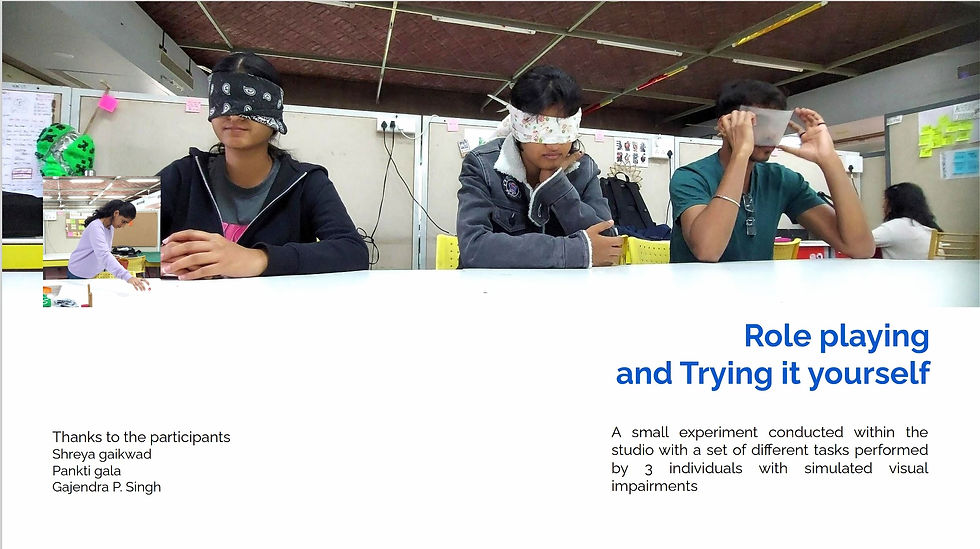


Simulated impairments
Complete blindness
Partial blindness
Observation
Frying is very dangerous due to uncertainty of splashing oil
No means of knowing if its cooked properly
Avoid it completely
Uncertain splashes in the front
Pan always on burner before turning it on
Hands, fingertips touching hot vessels to locate position and temperature
Touching warm vessels is an issue but due to years of doing the same don't identify it as a problem. Burnt and hardened fingers over the years due to it
The pan support don't hold the vessel in place on cooktop. It may easily topple with accidental push to the handle of the vessel while cooking
Need to remember where the spoon is kept while cooking
Insights
Tactile, auditory and smell cues are core to performing any task
The learning curve is difficult because of using conventional products the best way they can.
While designing a new interface their familiarity with the current has to taken into consideration

Since the problem area identified were very specific task oriented. The challenge was to find a middle ground where most of the issues can be addressed.....hence
A Cooktop
Usually the cooktop is the main part of the kitchen or we can say the life of the kitchen which is accessed by every member of the family and hence it must be compatible, inclusive, user friendly and safe at the same time.

Ideation

Form iteration
keeping function in mind


Dial and Knobs
tactile UI iterations
Buttons
tactile UI iterations
Mockups


Stage 1
Initial testing in Thermocol models

Stage 2
more refined models, with tactile cues


Braille is too small to read in this dimension hence I shifted to tactile icons
Rest ,They loved it !

UNITOP
The Universal induction cooktop

Power ON/OFF
On/ Pause
Timer
Presets
Digital screen
Temperature
Heating area
Tactile demarcation of minimum utensil base limit
Tactile demarcation maximum utensil base limit/ heating area

Groove in the middle
Designated space to keep spoons, ladles and cutlery while cooking.
Reduces mental load to relocate the cutlery on the countertop

Temperature and timer dial/knob
Temperature knob
The temperature markings are placed in way such that it imitates the knob movement on a normal gas stove
-This makes the transition easier and familiar
-Does not restrict the wrist movement

Tactile demarcation/ raised marking
Auditory feedback of natural tick as the knob is rotated
Timer knob
Moves back to zero as time recedes
The two set of knobs have a distinct grip/ texture to differentiate between the timer and temperature
The button on the knob, when pressed gives audio feedback of the option its pointing at that moment


Smooth Curves and indents so that spills are directed towards the sides of the cooktop and not in back and front .


Each Icon is a simplified raised tactile cue to depict a particular preset such that it is easy to differentiate between any two different presets

Each button glows and is slightly raised when activated
Buttons on the sides


Turn Audio feedback ON/OFF
Lock all the presets and buttons.
This button is positioned such that it is difficult for a child to reach it
Power ON/OFF


Contrasting elements for Partially blind
Although vision might be not good, but contrasting colors help is distinction different surfaces or objects.

Thank you !

Acknowledgement
This project would have been impossible without the Support of Blind People’s association. I would like to thank Ranchod Soni, Kinnari desai, Manubhai, Jaydev, Payal sharma and many others at BPA who participated in my research.I would also like to thank Kanchan patel and her family for their cooperation and enthusiasm in my project